

Copyright © 2025 All rights reserved. Built with love in Texas.
Branding Product SaaS Web App
About a Project Imaginarium Mobile is the companion mobile application for the Imaginarium platform—a storytelling ecosystem for writers and screenwriters. Unlike the admin dashboard or the desktop web experience, the mobile app was designed specifically for on-the-go creative workflows and fast, intuitive storytelling assistance. This version allows users to build their stories, manage characters, and […]
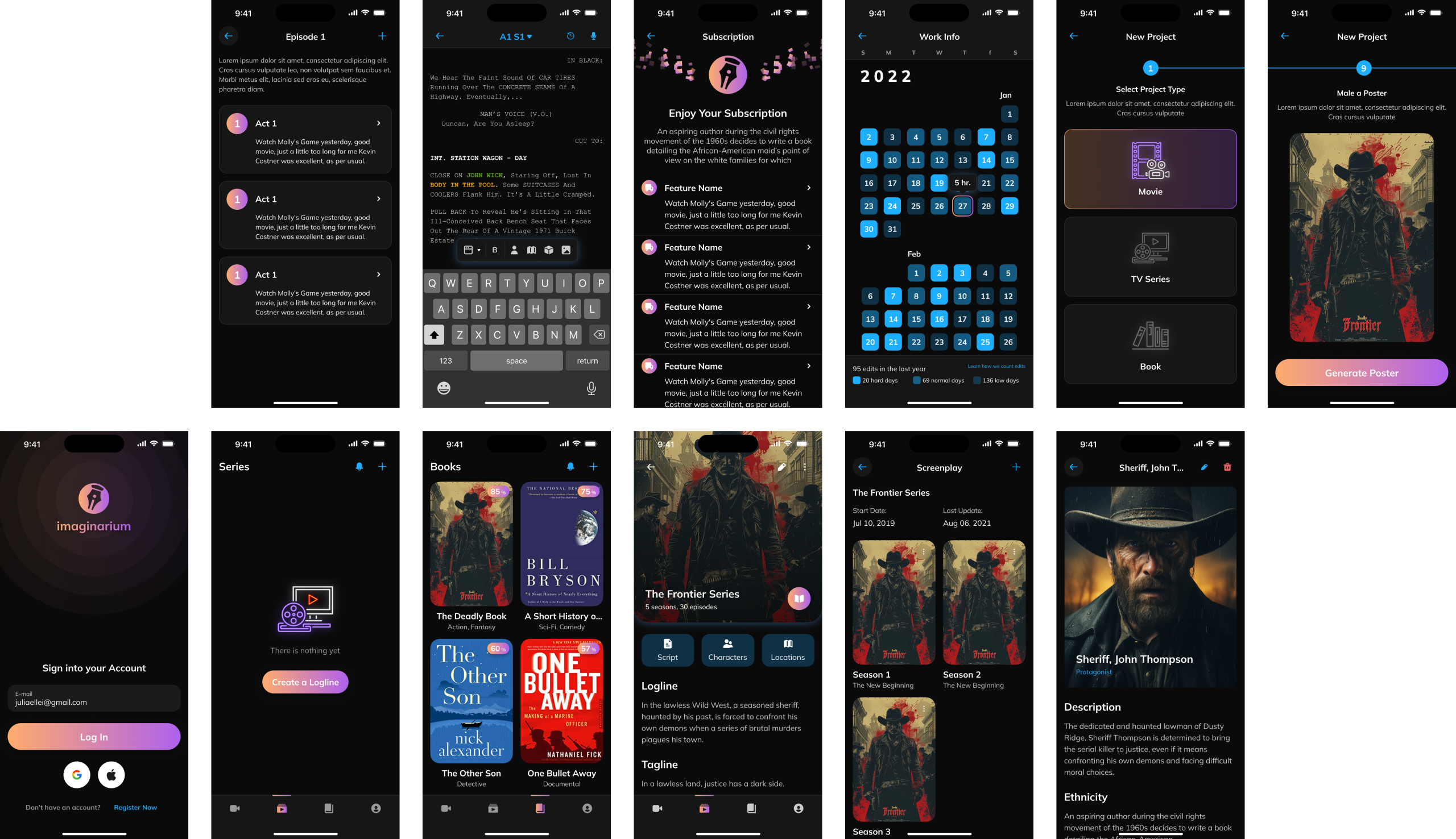
Imaginarium Mobile is the companion mobile application for the Imaginarium platform—a storytelling ecosystem for writers and screenwriters. Unlike the admin dashboard or the desktop web experience, the mobile app was designed specifically for on-the-go creative workflows and fast, intuitive storytelling assistance.
This version allows users to build their stories, manage characters, and outline episodes from anywhere, while syncing with the broader Imaginarium ecosystem. It required unique UX and UI adaptations to fit mobile interaction patterns without sacrificing feature depth.
Adapt the Imaginarium experience to mobile without compromise
Prioritize readability, ease of navigation, and accessibility
Maintain core functionality: project creation, character and location building, logline/scene planning
Introduce mobile-native features like AI text highlighting and poster generation
Ensure feature parity across iOS and Android
Core Mobile Features:
Account login and project sync
Create new project (TV series, movie, book)
Generate poster with AI
Series/season/episode structure
Character & location management
Word editor with AI highlights
Book shelf and logline repository
Studied writing behavior via mobile (journaling apps, script notes)
Identified user journeys with limited screen real estate
Ran usability tests with existing Imaginarium users to validate portable workflows
Rebuilt flows for mobile-friendly entry points (e.g. creating loglines, tagging characters, visual project starts)
Fully custom mobile design system, not a copy of web components
Dark theme optimized for night writing
Large tap targets, bottom navigation, responsive cards
Native input and OS-adaptive interactions for iOS and Android
AI-generated project posters from user prompt
Highlighting of characters, locations, and narrative elements inside editor
Touch-friendly logline creation & editing
Calendar-based writing tracker for consistent habits
Lorem ipsum dolor sit amet, consectetur adipiscing elit. Ut elit tellus, luctus nec ullamcorper mattis, pulvinar dapibus leo.
The mobile version of Imaginarium opened a new chapter in helping writers stay inspired wherever they are. It wasn’t a simplified copy—it was a reimagined creative assistant in your pocket.
Positive feedback from testers about creative portability
Significantly reduced friction for quick scene or logline capture
Provided standalone value even without desktop access
Enabled real-time syncing across devices with version history
Mobile-first storytelling must balance simplicity with power
Consistency between platforms should not mean identical UX
Creative professionals need emotional and visual connection to tools
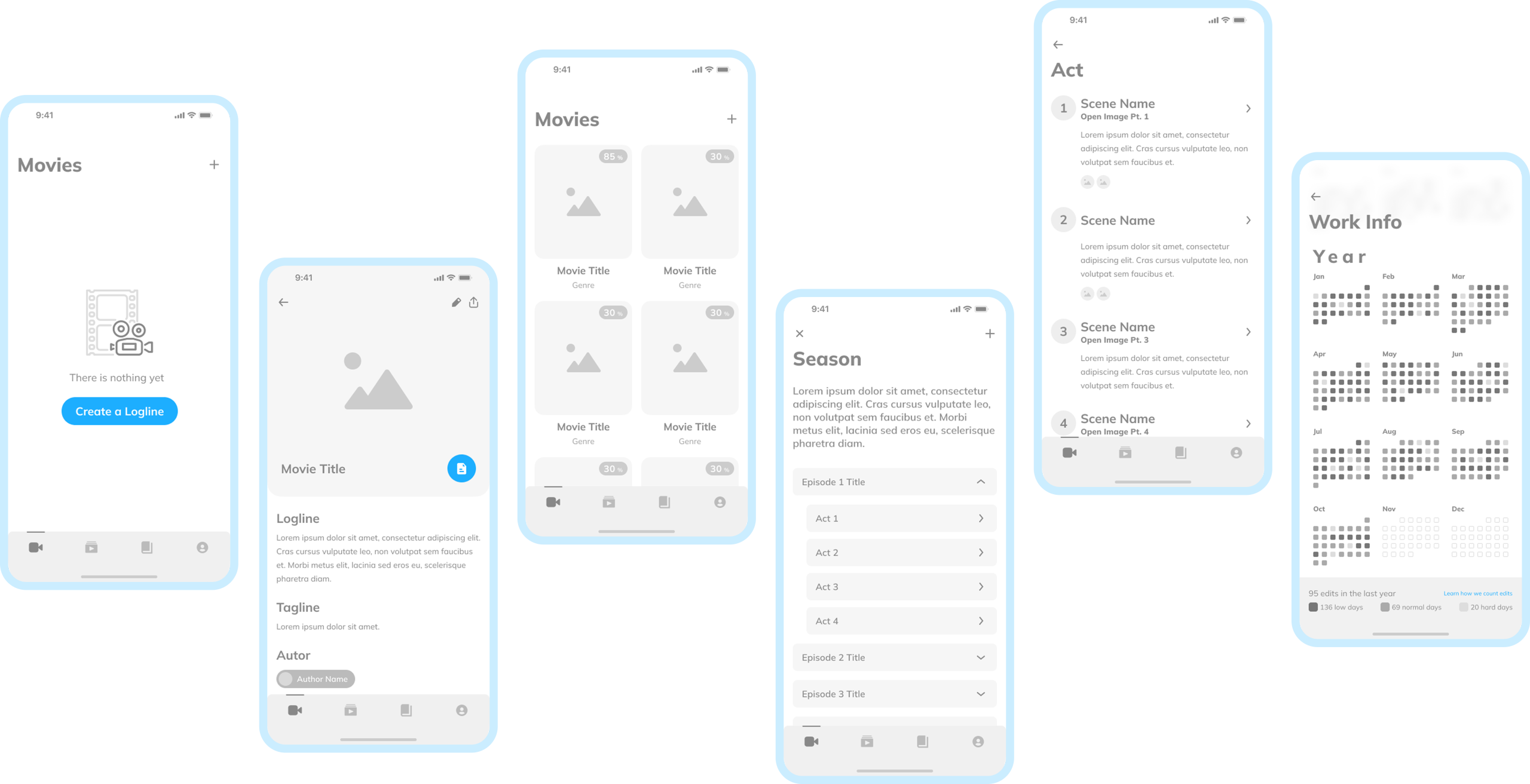
o ensure the experience was optimized for mobile workflows, early-stage wireframes were used to validate core flows and interaction logic. These grayscale layouts focused on structure over polish and helped guide:
Empty states and microinteractions (e.g., “Create a Logline”)
Navigation clarity via bottom tab bar
Feature grouping (Movies, Series, Acts, Calendar)
Flow logic between project overview and writing/editor modules
These wireframes acted as the blueprint for translating the expansive web experience into a streamlined mobile-first narrative tool.
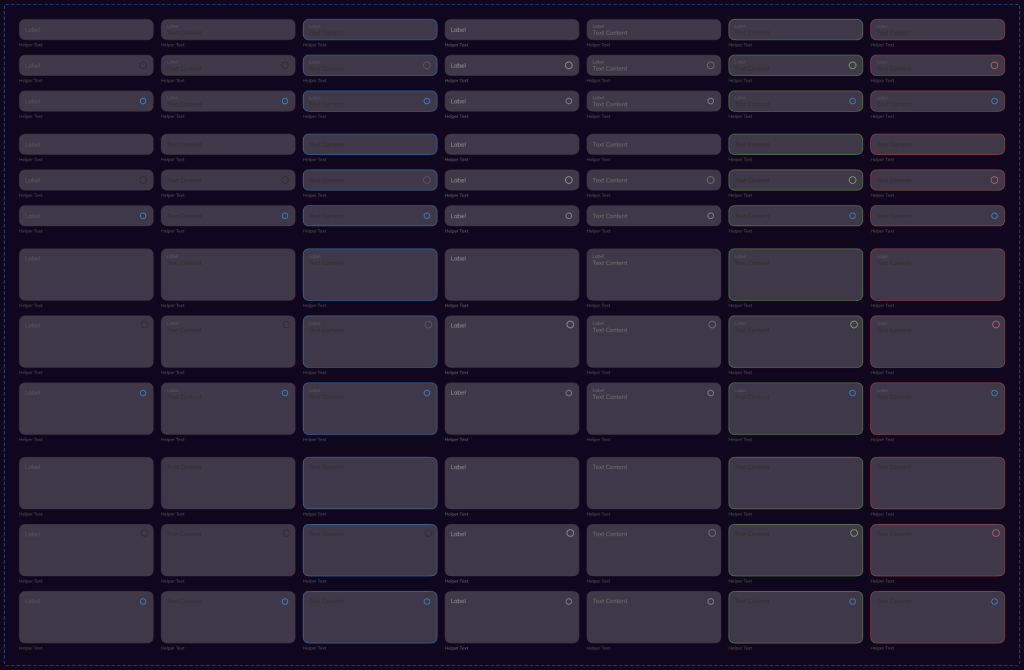
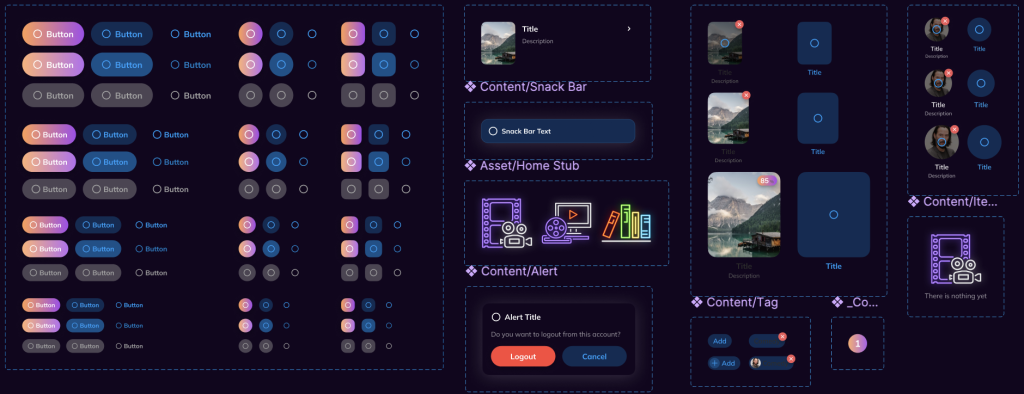
A fully custom mobile-first design system was created from scratch to support responsiveness, touch-friendly interactions, and platform-native patterns.
The system includes button states, icons, alerts, snackbars, content cards, and avatar stacks—optimized for both light and dark themes.
Components were built in Figma using auto-layout, constraints, and variant-driven logic to maintain consistency across over 50 mobile screens.
Contrast, spacing, and visual hierarchy were tuned for accessibility and quick thumb scanning.
Design System Highlights:
Over 100 reusable components, including variants for state and platform
Atomic structure enabling scalability and rapid iteration
Designed with developer handoff in mind using tokens and documentatio
Screen-by-Screen Feature Details
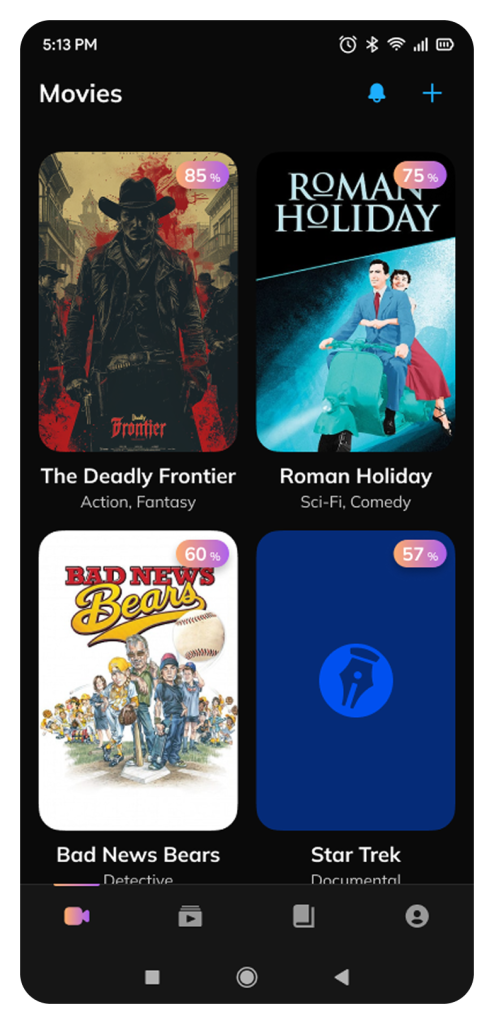
This screen showcases the user’s personal project gallery. Each tile includes:
Cover artwork
Project title & genre
AI-generated story quality score (upper-right badge)
💡 Design intent: Create a scannable, media-rich overview using large visuals and color-coded feedback. The quality badge nudges users to revisit or improve drafts.
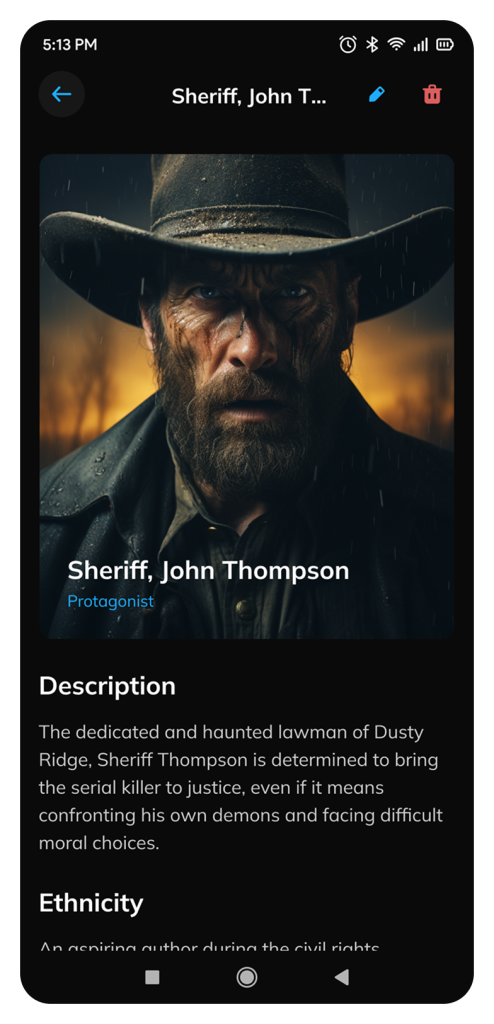
A dedicated screen for viewing and editing key characters. Includes:
Full-screen AI-generated portrait
Role tag (e.g., “Protagonist”)
Narrative description
Categorical attributes (e.g., ethnicity, background)
💡 Design intent: Humanize the writing process by giving visual life to characters, and allow deep editing through a clean, immersive layout.
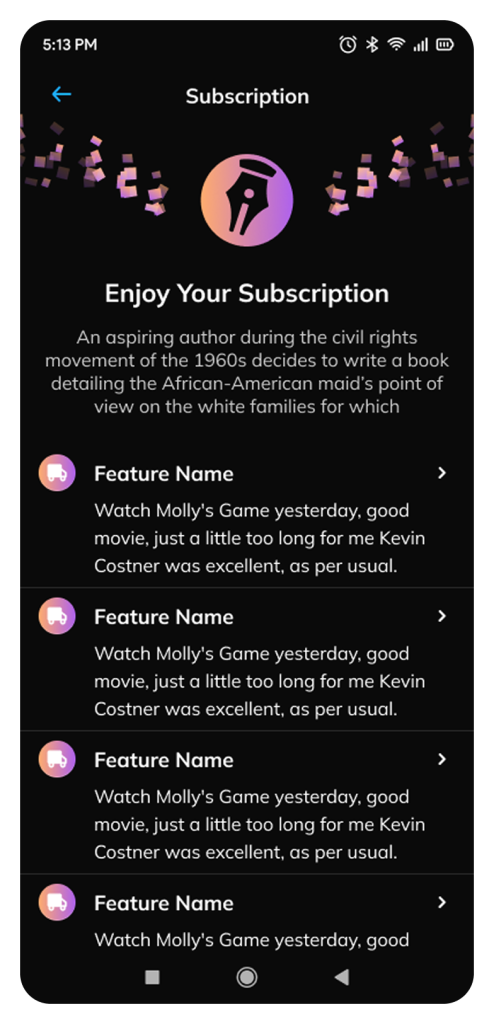
A premium access screen that lists exclusive features. It uses:
Branded animation header for celebration
Bullet-style benefits layout
Iconography to differentiate modules
💡 Design intent: Reinforce brand value and entice upgrades by combining visual delight with informational clarity.
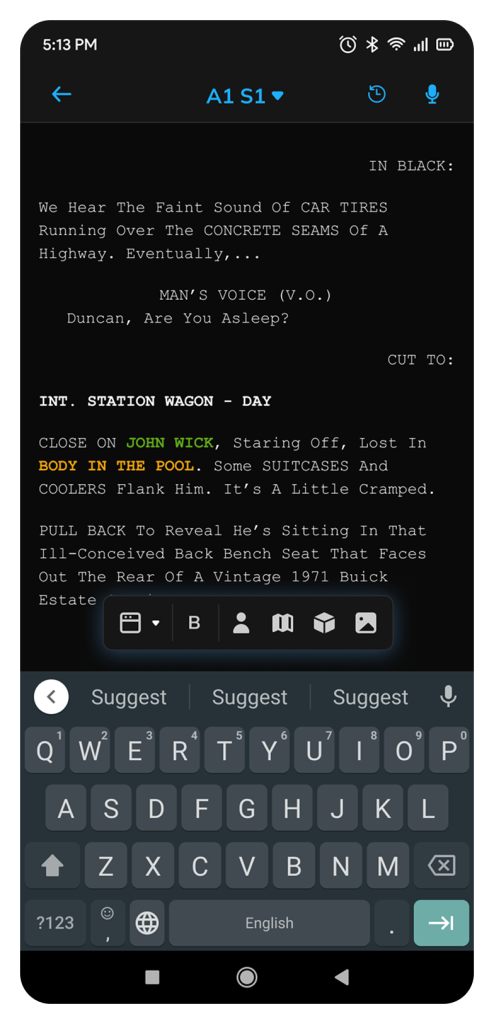
Mobile-native script editor with:
Industry-standard screenplay formatting
Real-time AI-enhanced word tagging (characters in green, locations in orange)
Bottom action bar with common writer tools (bold, insert, generate, etc.)
💡 Design intent: Bring professional-grade screenplay writing to mobile while making AI support feel seamless and natural, not intrusive.